> For the complete documentation index, see [llms.txt](https://help.genesis.autify.com/llms.txt). Markdown versions of documentation pages are available by appending `.md` to page URLs; this page is available as [Markdown](https://help.genesis.autify.com/features-ja/settings/connection-settings/mcp-server.md).

# MCPサーバー

本記事では、Autify Genesis の **MCPサーバー** 設定について説明します。Genesis を MCP（Model Context Protocol）対応クライアントと連携するための接続情報を確認できます。

## サーバーURL

MCP 対応クライアント（Claude Desktop、Cursor、VS Code など）に設定するエンドポイント URL を確認できます。 **URLをコピー** をクリックしてコピーします。

<figure><img src="/files/4kJ9tH4k7av6vl77QCkb" alt="サーバーURLのスクリーンショット"><figcaption><p>サーバーURL</p></figcaption></figure>

## 認証

Genesis MCPサーバーでは、OAuth 2.1 with PKCE に加えて API キーの Bearer 認証も利用できます。

* OAuth を使う場合は、初回接続時にブラウザが開き、アクセスを承認します。
* API キーを使う場合は、`Authorization: Bearer {APIキー}` ヘッダーを設定します。API キーの作成方法は [APIキー管理](/features-ja/settings/organization-settings/api-key-management.md) を参照してください。

## はじめに（クライアント別の設定手順）

利用するクライアントに応じて、次の手順で Genesis MCPサーバーを設定します。

### Claude Desktop

Claude Desktop は stdio 接続のみサポートしています。`mcp-remote` をブリッジとして使用し、`claude_desktop_config.json` に以下を追加してください。`SERVER-URL` は Genesis の **サーバーURL** に置き換えます。

```json
{
  "mcpServers": {
    "genesis": {
      "command": "npx",
      "args": [
        "-y",
        "mcp-remote",
        "SERVER-URL"
      ]
    }
  }
}
```

または、Claude Connectors（設定 > コネクタ > カスタムコネクタを追加）を使用して、設定ファイルを編集せずに直接接続することもできます。詳細については、Claude Support の [Getting started with custom connectors using remote MCP](https://support.claude.com/en/articles/11175166-getting-started-with-custom-connectors-using-remote-mcp) を参照してください。

### Cursor / VS Code

`.cursor/mcp.json` または `.vscode/mcp.json` に以下を追加してください。`SERVER-URL` は Genesis の **サーバーURL** に置き換えます。

```json
{
  "mcpServers": {
    "genesis": {
      "url": "SERVER-URL"
    }
  }
}
```

### Claude Code

ターミナルで以下のコマンドを実行して Genesis MCPサーバーを追加してください。詳細については、Claude Code ドキュメントの [Model Context Protocol (MCP)](https://code.claude.com/docs/en/mcp) を参照してください。

```bash
claude mcp add --transport http genesis \
  https://genesis.autify.com/api/mcp
```

{% hint style="info" %}
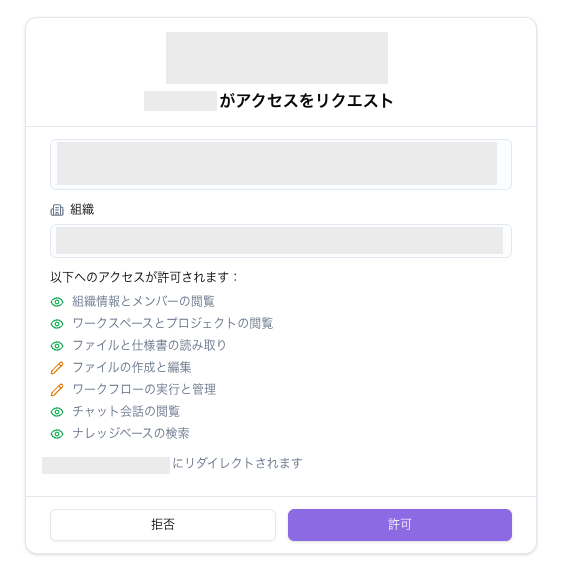
OAuth を使うクライアントでは、初回接続時にブラウザが開き、アクセスを承認します。
{% endhint %}

<figure><img src="/files/sJnZFGDvig7DW6mOtVwQ" alt="OAuth 認証画面のスクリーンショット"><figcaption><p>OAuth 認証画面</p></figcaption></figure>

## 利用可能なツール

接続された MCP クライアントから呼び出せるツールはカテゴリ別に整理されており、設定ページの **利用可能なツール** カードで最新の一覧と検索ができます。各ツールには **読み取り** / **書き込み** / **破壊的** のいずれかのバッジが付与されます。

主なカテゴリと代表的なツールは次のとおりです。

| カテゴリ         | 代表的なツール                                                                                                                                                                                                                                                 |
| ------------ | ------------------------------------------------------------------------------------------------------------------------------------------------------------------------------------------------------------------------------------------------------- |
| 組織           | `get_organization`、`list_organizations`                                                                                                                                                                                                                 |
| ワークスペース      | `list_workspaces`、`get_workspace`、`list_codebases`                                                                                                                                                                                                      |
| ワークフローテンプレート | `list_workflow_templates`、`get_workflow_template`、`create_workflow_template`、`update_workflow_template`、`duplicate_workflow_template`、`archive_workflow_template`                                                                                       |
| ワークフロー実行     | `run_workflow`、`get_workflow_execution`、`list_workflow_executions`、`cancel_workflow_execution`、`resume_workflow_execution`、`get_workflow_execution_usage`、`list_artifacts`、`get_artifact`、`get_artifact_traces`                                         |
| ファイル         | `list_files`、`get_file`、`get_file_content`、`create_file`、`update_file_content`、`delete_file`、`move_file`、`update_file_labels`、`list_file_labels`、`reindex_file`、`list_file_versions`、`delete_file_version`、`restore_file_version`、`rename_file_version` |
| ディレクトリ       | `list_directories`、`list_directory_contents`、`create_directory`、`update_directory`、`delete_directory`、`move_directory`、`get_directory_breadcrumbs`                                                                                                      |
| ナレッジベース      | `search_knowledge_base`                                                                                                                                                                                                                                 |
| メトリクスダッシュボード | `list_metrics_widgets`、`list_metrics_widget_source_files`、`list_metrics_widget_versions`、`discover_metrics_widget_fields`、`get_metrics_widget_chart_data`、`create_metrics_widget`、`update_metrics_widget`                                               |
| 動画           | `analyze_video`                                                                                                                                                                                                                                         |
| Bash         | `bash`                                                                                                                                                                                                                                                  |

ツールごとの詳細な説明・パラメーター・読み取り/書き込み/破壊的の区分は、 **利用可能なツール** カードの検索ボックスや、各 MCP クライアントが取得するツール定義から確認できます。


---

# Agent Instructions
This documentation is published with GitBook. GitBook is the documentation platform designed so that both humans and AI agents can read, navigate, and reason over technical content effectively. Learn more at gitbook.com.

## Querying This Documentation
If you need additional information that is not directly available in this page, you can query the documentation dynamically by asking a question.

Perform an HTTP GET request on the current page URL with the `ask` query parameter, and the optional `goal` query parameter:

```
GET https://help.genesis.autify.com/features-ja/settings/connection-settings/mcp-server.md?ask=<question>&goal=<endgoal>
```

`ask` is the immediate question: it should be specific, self-contained, and written in natural language.
`goal` is optional and describes the broader end goal you are ultimately trying to accomplish on behalf of the user. GitBook uses it to tailor the answer towards what is most useful for that goal.

The response will contain a direct answer to the question and relevant excerpts and sources from the documentation.

Use this mechanism when the answer is not explicitly present in the current page, you need clarification or additional context, or you want to retrieve related documentation sections.